Powered By Blogger
Posts tonen met het label SimGuru bericht. Alle posts tonen

dinsdag 30 juni 2009

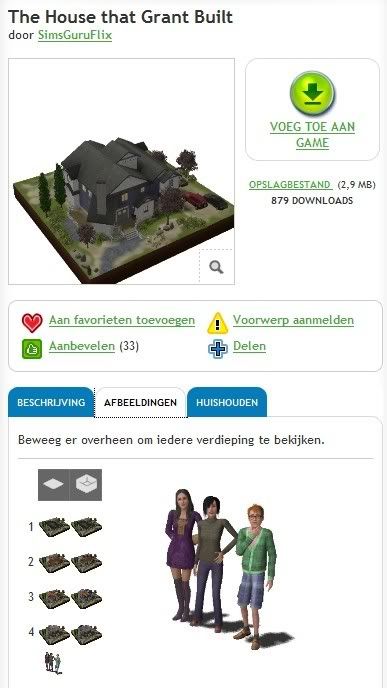
Huis met Kim en Piper en Liam op de Sims 3 exchange


We kennen Kim Kent, Piper Hipp en Liam O'Dourke denk ik wel van de vele promoties van Sims 3 voor de release en nu heeft SimsGuru Flix ze alle drie (als Jongvolwassene) in 1 huis gezet.

Je vindt het huis en de 3 bewoners op deze pagina van de Sims 3 exchange.

Lees meer...

zondag 7 juni 2009

De Sims 3: ‘Verhaal vooruitgang’ uitzetten

Het lijkt erop dat de optie ‘verhaal vooruitgang’ niet doet waarvoor het gemaakt was. Simguru Lyndsay heeft hiervoor een tijdelijke oplossing totdat de toekomstige patch wordt uitgebracht. Ik heb eventjes de tijd genomen om het te vertalen en er een paar plaatjes bij te doen zodat iedereen 100% begrijpt wat je precies moet doen. Het Engelse bericht kan je hier vinden: SimGuru Lyndsay over uitzetten 'verhaal vooruitgang'

Let op! De tijdelijke oplossing geldt alleen voor PC’s. Mac gebruikers moeten nog eventjes geduld hebben.

Stap 1:
Ga naar het .exe bestandje van De Sims 3 (C:\Program Files\Electronic Arts\The Sims 3\Game\Bin). Als je de snelkoppeling van de launcher op je bureaublad hebt staan kan je het makkelijk vinden door rechts op het bureaublad icoontje te drukken en te kiezen voor ‘Bestandslocatie openen’.


En anders staat het meestal hieronder:


Stap 2:
Maak een snelkoppeling naar je bureaublad van TS3.exe


Let op! Haal Sims33launcher.exe en TS3.exe niet door elkaar!

Stap 3:
Klik met de rechtermuisknop op de TS3.exe snelkoppeling op je bureaublad en klik op ‘eigenschappen’.

Stap 4:
Als je in de eigenschappen bent ga je naar ‘Doel’. Ga naar het einde van het lijntje, druk 1x op spatie en typ dan: -disablestoryprogression


Stap 5:
Vanaf dit punt zal je het spel moeten opstarten via de TS3.exe snelkoppeling die je zojuist hebt aangemaakt. Anders werkt de toepassing niet.


Dit zal echter niet 100% helpen. Er zullen een aantal situaties in de buurt zijn die wel voortzetten. Zelfs als je de voortgang hebt uitgezet met de toepassing.
- Elke Sim die al zwanger was zal toch bevallen;
- Als ouder worden aanstaat zullen Sims toch sterven;
- Wanneer jouw Sim een nieuw baan krijgt kan het zijn dat de Sims in de buurt een nieuwe baan of positie krijgen. Om jouw baas of collega te kunnen zijn.

Lees meer...

SimGuru BGY 11 over Cyclic Redundancy Check error

Op Het Amerikaanse Sims 3 forum een post van SimGuru BGY 11 over de Cyclic Redundancy Check error.

Hi, simmers!

If you are experiencing a cyclic redundancy check error, we’d like you to do the following so we can keep the number of threads on that issue to a minimum:

*Run the Windows Defragmenter software on your system. Fragmented hard disk space can cause this error.

*CRC errors may also be caused by a hard disk or DVD drive failing or being unable to write consistent data.

If you have run the Defragmenter software and are continuing to experience this error, please contact your system’s manufacturer for further diagnostics.

Update:
It appears that in some cases, users that are using the EA download Manager version of The Sims 3 may experience this error if their download is paused. To resolve this issue, perform the following steps:

*Log in to the EADM.
*Click on the red x in the upper right part of the Sims 3 download to clear the EADM cache.
*Re-download The Sims 3; do not pause the download.

Update 2 (6/4/09):
There is a new FAQ addressing this issue.

We understand that this has become a very frustrating issue for many simmers that are eager to play the game, and as more information or solutions become available, we will post them here in the Support forum. Thank you all for your patience!

Lees meer...

zaterdag 6 juni 2009

SimGuru Kyle over Sims 3 Store

Er zijn wat Simmers die problemen hebben met de Sims 3 Store, bijvoorbeeld met het aanmelden en downloaden vandaar dat ik deze tekst van SimGuru Kyle van de Amerikaanse Sims 3 site hier ook even neerzet.

Quick Guide to downloading and installing Store and Exchange content

Hey folks, SimGuruKyle here again.

There seems to have been some confusion over this, possibly because its a different system than that used for The Sims 2, so I've decided to post a sticky explaining how it works. Hopefully, it'll save me a few individual posts, because I'm just lazy like that (or maybe just too busy playing... I mean working... on Sims 3).

So, here's the step by step process for those of you who have been having trouble, starting with registering your game to your account and making sure that The Sims 3 and all related programs (Launcher, EADM, etc) are closed-

Double click the Sims 3 icon on your desktop, or click the Sims 3 shortcut in your start menu. This should automatically start the Sims 3 Launcher, as well as the EADM in the background. Don't worry about the EADM, since in the Sims 3, unlike the Sims 2, it just acts as a middleman between the Store and your Launcher. Just leave it minimized in your system tray (where it should appear as a little green circle).

Now that your Launcher is up, open your browser (IE7, IE8, or recently updated Firefox or Mozilla preferred), and go to the Sims 3 Store page. Log in to the account on which your game is registered.

You can download free content from the Store like Riverview and the promotional Prius, or you can purchase new content from the Store, or you can get user-made content from the Exchange. If you've already purchased items on this account, you can re-download them by either going to their page (where the "Buy Now" button should have been replaced by a "Download Again" link), or going to the "Purchase History" page under the "My Account" tab on the bottom left side of the Store page (the site may ask you to re-enter your password when you try to go there).

When you try to download an item for the first time, the site will produce a little pop-up asking if you have the Sims 3 and the EADM installed. Check the "yes" box and confirm. Your browser and any anti-virus software may also produce pop-ups, asking if you want to let the site access a program on your computer, or to confirm whether you want the file being downloaded to be used by the Launcher, etc. Just click "yes" or "confirm" to all of these popups.

Your download should now appear in the Downloads section of the Launcher. Let the download complete, and it should show an entry for it with a thumbnail and the item's name. If a big red circle-and-slash symbol appears there, however, it means that there was a problem with the download. In that case, simply select the download using the checkbox next to its name, hit the "delete" button in the Launcher, and attempt to download the file again. If problems persist, you may be having a Proxy or Firewall issue, or the site may be having problems due to traffic. Wait a while, try again, and if its still broken, try posting in the "Technical Discussions" section of the Store boards.

Once the content is downloaded, you can either hit the "Select All" button in the Downloads section of the Launcher, or manually select each piece of content by clicking the checkbox next to its name (the entry for the item should highlight as yellow while its selected). Once you've selected all the content you wish to install, hit the "Install" button in the Launcher.

In a few moments, the Installer program should start up and appear as a new window. It will take some time to finish starting up, and then it will begin installing all your content one by one. Please be patient while this completes. You cannot install content while the Sims 3 game is running, so make sure that it is shut down when you attempt to install content. Once the install process completes, hit the "OK" button, and the installer will close automatically. You should then be able to click on the "Installed Content" button on the side of the Launcher, and in that section you should see the content you've just installed to your game, as well as the options to uninstall it.

Now, press the Play Now button in the Launcher, and your game will start, and your content will be waiting for you. Build/buy objects will appear in Build/Buy mode, custom presets will appear in the Create a Style tool for an object or outfit, hairs and clothing will appear in CAS, Families and Lots will appear in the Sim Bin, and individual pre-made Sims should appear in CAS in the "Pre-Made Sims" section.

If you want to download content to one computer and then install it on another (for instance, if the computer with your Sims 3 game on it does not have an internet connection), you can only do this with Exchange content (by using the "Save File" link under the "Add to Game" button on the content's page), because Store downloads have to be verified when downloaded, and thus needs the EADM and Launcher to work. Just cut-and-paste the Exchange content into the My Documents\Electronic Arts\The Sims 3\Downloads folder, start the Launcher, and the content should appear in the Downloads section.

I hope that helps, and have fun playing the Sims 3 with your new downloaded content.

Lees meer...

SimGuru Drea over Disc Authentication Failure error

Een andere post op de officiële Amerikaanse Sims 3 site gaat over de 'Disc Authentication Failure error' melding die sommige Simmers krijgen. Op deze pagina van EA Support staat ook een hele tekst erover dus als je deze error krijgt moet je daar ook maar even gaan kijken.

Hi everyone,

We are in the process of researching possible causes of the Disc Authentication Failure errors that some of you are dealing with. While we don’t have one solution that will address everyone’s issue we have discovered a few things that we want to pass along to you. Hopefully this information will enable you to get started playing The Sims 3.

We’ve been able to identify a couple of causes for the Disc Authentication Failure message.

In many of the dxDiag reports we’ve received a specific DVD drive is listed. That drive, MATSHTA DVD-RAM UJ-841S, appears to be common to many users who are getting disc failure messages. This drive is also commonly used in Toshiba laptops. It is recommended that you visit the Toshiba or MATSHTA support forums to better understand how to fix this drive.

We will continue to research issues associated with this specific DVD drive and post anything conclusive on The Sims 3 forum.

Another potential cause that we are researching has to do with the existence of software that manages DVD drives. This software provides features such as the ability to drag and drop files directly on to a drive letter for the purposes of burning DVDs. Examples of software that we are aware of that cause problems include Sonic and Roxio and they use DLA (Drive Letter Access) applications. This software is known to cause issues with games and disc authentication.

Below you will find some things you can try if you have this software or something similar on your system.

- In My Computer, right click on the DVD drive letter that you are using to run your game. If you are running Sonic or Roxio you will likely see a ‘DLA’ tab in the properties panel. You should be able to disable the software from this panel. After you disable this software you will need to reboot your system for it to take effect.

- Updating the version of software that is used to access and use your DVD drive may help.

- Uninstalling the DLA software completely may help.

- DLA appears to be specific to Sonic and Roxio. Other DVD management software may be doing something similar and the steps above may apply to those applications as well.

This is what we know so far. We will update the forum as we learn more.

Lees meer...

SimGuru Lyndsay over uitzetten 'verhaal vooruitgang'

Op de Amerikaanse Sims 3 site heeft SimGuru Lyndsay een post gemaakt over het uitzetten van de optie 'Verhaal Vooruitgang. Deze schijnt niet te werken maar EA heeft daarvoor een oplossing gevonden.

De optie Verhaal Vooruitgang laat de buurt leven: buurtgenoten leven gewoon door, trouwen, krijgen promotie enzo maar sommige van ons willen deze optie niet. Deze oplossing werkt trouwens alleen voor de PC.

Een vertaling van dit bericht vindt je hier op ons blog.

Hi All – I’ve seen many conversations popping up about our game feature called Story Progression and the fact that the option to turn it off doesn’t work. We’ve been investigating this and have found that the toggle is not doing what it was intended to do. We are working to address this asap but in the meantime there is a workaround for PCs.

For PC:
1) Find your game executable. It should be here: C:\Program Files\Electronic Arts\The Sims 3\Game\Bin
2) Create a shortcut on your desktop to the TS3.exe.
3) Right-Click on the shortcut and choose “Properties”
4) In the top line “Target:” go to the end of the line and add this tag –disablestoryprogression
** You Simmers have been awesome and pointed out you need to make sure there is a space BEFORE the dash in your target line. Thanks guys!
5) From this point on you will need to run your game from this shortcut and NOT through your launcher.

There isn’t a work around for Mac at this time.

I realize this is a certainly not ideal but it will address the issue while we are working on a real fix.

I also want to mention that there are a few events that can still occur even if story progression is completely off.
- Any pre-made pregnant Sims will still have their babies.
- If Aging is on, Sims will still die.
- As YOUR Sims get new jobs, other Sims in the neighborhood may have their careers reassigned to become your boss or co-workers.

Thanks so much for your patience.

- Lyndsay

PS. If you want your story progression back on you need to remove this tag from your shortcut.

Lees meer...

Meer informatie over Sims 3 buurt Riverview


Een aantal dagen geleden hebben we in dit blogbericht al aandacht besteed aan een bericht van Sim Guru Rain over de nieuwe buurt Riverview. Sim Guru Rain is een van de Sims 3 producers die aan Riverview gewerkt heeft en dit bericht is nu vertaald en op deze pagina van de officiële Nederlandse Sims 3 site gezet.

Hoi, ik ben La Shawn (ook wel bekend als Rain :)) en ik ben de producent van de stad Riverview. Riverview is een exclusieve nieuwe stad, die je gratis kunt downloaden via De Sims 3 Store, nadat je je game geregistreerd hebt.

Je kunt allerlei interessante dingen doen in Riverview. Zo kun je naar de zelfbedieningssapbar, 'The Water Hole', gaan voor een koel glaasje sap, edelstenen en metaal zoeken bij de verlaten mijn, of vlinders vangen bij Simhenge.

Je kunt ook de lokale Viskwekerij bezoeken. Daar vind je heel veel vis, maar de bewoners van Riverview kunnen er ook zoutwatervissen vangen die ze nergens anders kunnen vinden. Tieners gaan graag met een draagbare radio onder de arm naar pakhuis 'All the Rave', om daar tot in de vroege uurtjes lekker te dansen.

Als je Riverview gedownload hebt, krijg je toegang tot een aantal nieuwe decoratieve voorwerpen waarmee je je stad een knus plattelandskarakter kunt geven. Zo heb je bijvoorbeeld: een oude boot die half vergaan is, een vogelverschrikker voor in de prachtige tuinen van je Sims, charmante provinciale gebouwen en veel decoraties voor in en om het huis.

Wat ik zo leuk vind aan Riverview, zijn alle interessante families waarmee je Sims kennis kunnen maken. Iedere familie heeft een interessante geschiedenis en geheimen die je kunt ontrafelen.

Hannah Jones en haar man Aiden hebben het Remington-huis pas betrokken (je weet wel, dat enge huis op de heuvel waar menig griezelboek over geschreven is). De vorige bewoners waren familieleden van Hannah. Zij werden het slachtoffer van een lange reeks nare gebeurtenissen. Hannah was het enige nog in leven zijnde familielid en erfde dus deze prachtige, ietwat excentrieke villa.Een van de grootste problemen van de familie Jones is dat de vorige bewoners nooit helemaal vertrokken zijn!

Robert en Mags Newbie zijn samen met hun tienerzoon Bob in Riverview komen wonen.Bob had moeite om zijn draai te vinden na de verhuizing, maar hij heeft een nieuwe vriend gevonden waar hij al zijn vrije tijd mee doorbrengt.

De familie Broke woont in het rustiekere gedeelte van de stad. Als je De Sims 2 gespeeld hebt, dan zul je hun verhaal vast heel interessant vinden. (Hint: Je moet twee keer Skippen, anders werkt het niet.)

De gezusters Lin kunnen het niet goed met elkaar vinden en zijn allebei heel eigenwijs. Toen ze het huis van hun ouders erfden, konden ze het enkel eens worden over het plan om het huis in tweeën te delen. Ze hebben allebei hun helften geheel volgens eigen smaak ingericht, zonder met elkaar te overleggen. Het resultaat: een zeer aparte mengelmoes van stijlen.

De families Shallow en Grisby leven naast elkaar, maar zijn zeer verschillend. De koele bikkelharde familie Shallow bestaat uit beeldschone Sims, maar ik weet niet of er een huis groot genoeg is voor al hun ego's. De familie Grisby is daarentegen vriendelijk, aardig en gelukkig. Helaas worden er veel grappen over hun "unieke" uiterlijke kenmerken gemaakt.

Riverview is een prachtige en interessante stad. Het is aan jou om de verhalen tot leven te laten komen! Je kunt de stad gratis downloaden wanneer De Sims 3 in juni uitkomt.

Groetjes,
Rain

Lees meer...

vrijdag 5 juni 2009

Sims 3 creaties van Sneak Preview

Zoals jullie weten zijn wij op 15 mei naar een Sneak Preview geweest in Utrecht en daar kon iedereen een Sim maken of een huis voor in Sims 3.

Deze creaties staan nu op de pagina van Sim Guru Nita en kunnen zo gedownload worden.

Lees meer...

woensdag 3 juni 2009

EA: defragmenteer voor je Sims 3 installeert


Als je Sims 3 als digitale download hebt gekocht op de EA Store dan raad EA je aan om de download NIET op pauze te zetten maar alles in 1 keer te downloaden, dat zou een 'cyclic redundancy check error' kunnen veroorzaken.

Verder raad Sim Guru BGY 11 aan om je computer voor het installeren van Sims 3, volgens mij ook als je Sims 3 op DVD hebt, je computer te defragmenteren: 'Fragmented hard disk space can cause this error'.

Je kunt de post van Sim Guru BGY 11 op het Amerikaanse Sims 3 forum met wat tips en oplossingen voor de error lezen in de 'lees meer'.

Hi, simmers!

If you are experiencing a cyclic redundancy check error, we'd like you to do the following so we can keep the number of threads on that issue to a minimum:

*Run the Windows Defragmenter software on your system. Fragmented hard disk space can cause this error.

*CRC errors may also be caused by a hard disk or DVD drive failing or being unable to write consistent data.

If you have run the Defragmenter software and are continuing to experience this error, please contact your system's manufacturer for further diagnostics.

Update:
It appears that in some cases, users that are using the EA download Manager version of The Sims 3 may experience this error if their download is paused. To resolve this issue, perform the following steps:

*Log in to the EADM.
*Click on the red x in the upper right part of the Sims 3 download to clear the EADM cache.
*Re-download The Sims 3; do not pause the download.

We understand that this has become a very frustrating issue for many simmers that are eager to play the game, and as more information or solutions become available, we will post them here in the Support forum. Thank you all for your patience!

SimGuru_BGY_11

Lees meer...

dinsdag 2 juni 2009

Meer informatie over Sims 3 buurt Riverview

Sim Guru Rain heeft in haar blog meer informatie online gezet over de nieuwe Sims 3 buurt Riverview, onder andere over de families die er wonen. Zij is een van de Sims 3 producers die aan de buurt hebben gewerkt.

Ze verteld ook dat als je Riverview eenmaal hebt je ook extra decoratieve spullen hebt om de buurt nog mooier te maken:
Once you download Riverview there are a bunch of new decorative objects that you can place to give your town that down home, country feel. Some of these include: an old boat that has seen better days, a scarecrow to place in your Sims’ prized gardens, and some charming and more provincial looking buildings, as well as a large number of decorative features to place in and around your home.

De hele tekst kun je vinden in de 'lees meer'.

Hi, I’m La Shawn (otherwise known as Rain J) and I am the producer for the town of Riverview. Riverview is a seemingly sleepy little town that gives you a whole new neighborhood full of intriguing Sims to play with, new places to visit and new items to experience that can’t be found in Sunset Valley. Riverview can be downloaded for free from The Sims3.com after registering your game.

One of my favorite parts of Riverview is the families your Sims can meet there. Each family has an interesting history and secrets that you can uncover.

Hannah Jones and her husband, Aiden, recently moved into the Remington house (you know, the scary house on the hill from many a dark tale). The previous occupants, Hanna’s cousins, were victims of a long string of unfortunate events, leaving Hanna the only living relative to inherit the beautiful, albeit strangely built, mansion. One of the Jones’s biggest problems is that the previous occupants are still busy occupying!

Robert and Mags Newbie moved to Riverview along with their teenage son, Bob. Bob had a hard time adjusting to the move, but he’s found a new best friend to occupy his time.

The Broke family has their roots in the more rustic area of town. If you’ve played The Sims 2 you’ll have a very interesting time telling this story. (Hint: You’ll have to Skip twice for it to work.)

The Lin sisters don’t get along and are both very stubborn. When they inherited their parents’ old house, the only thing they could agree on is that they would each get their own half. They went about remodeling their halves without consulting each other which resulted in quite an… aesthetically interesting design.

The Shallow’s and the Grisby’s live next door to each other, but couldn’t be more different. The cold and callous Shallow family may be pleasing to the eye, but I don’t know if there is a house big enough to actually hold all of their egos. The Grisby’s, on the other hand, are kind, loving and happy, but tend to be the butt of everyone’s jokes due to their rather “unique” assets.

There are many interesting things to do in Riverview such as head down to the local, self-serve saloon, The Water Hole, for a cool glass of delicious juice; collect gems and metal out near the abandoned mine; or head to Simhenge to catch beautiful butterflies.

You can also visit the local Fish Hatchery that, because of an overabundance of fish, allows Riverview residents to catch the sallalalalaer fish that can’t be found in other places in the lakes and rivers. Teens like to grab a portable stereo and dance the night away at “All the Rave Warehouse.”

Once you download Riverview there are a bunch of new decorative objects that you can place to give your town that down home, country feel. Some of these include: an old boat that has seen better days, a scarecrow to place in your Sims’ prized gardens, and some charming and more provincial looking buildings, as well as a large number of decorative features to place in and around your home.

Riverview is a beautiful and interesting town just waiting for its story to be told! Download the town for free when The Sims 3 comes out in June.

Lees meer...

  © Blogger templates ProBlogger Template by Ourblogtemplates.com 2008

Back to TOP